
Microsoft is launching new features in Dynamics 365 Field Service that increase productivity for planners and frontline workers. In this release, you’ll discover how planning work orders becomes even easier and how executing work orders becomes less error-prone. New features have been added to take the integration with Project Operations to the next level, by introducing various connections between projects, project tasks, and work orders.
Top features
1. Productivity boost through stability and reduced error sensitivity
Microsoft introduces new features and updates for frontline workers in the mobile app. Adjustments and additions have been made to app (PCF) controls.
More prominent buttons have been introduced, making it easier to select or add a value to a field. This reduces the likelihood of input errors.
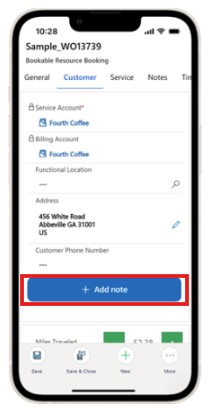
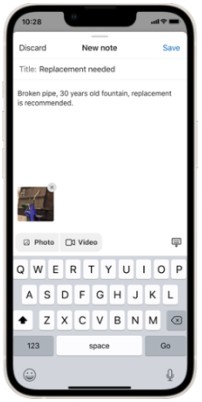
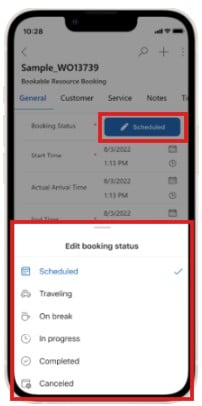
It is now also possible to configure lookup fields in such a way that unintended navigation is prevented.
In addition, an upgrade has been implemented that significantly improves screen loading times for Android users.
2. More flexible work planning for planners
Microsoft introduces features that simplify the collective adjustment of multiple bookings.
It is possible to select multiple bookings and collectively move them to another day or time. In addition to time changes, it is also possible to collectively change the assigned resource.
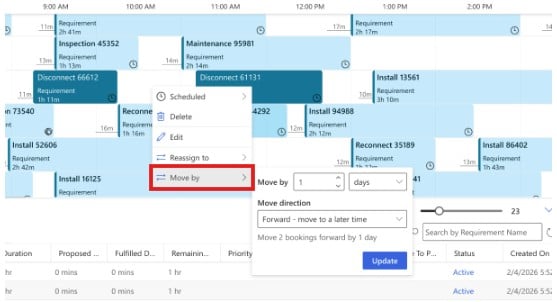
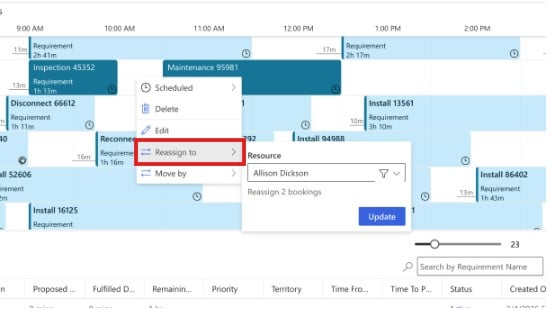
It is now also easier to cancel parts of a booking, eliminating the need to delete and recreate an entire booking.
In addition, small enhancements have been made that allow week numbers to be shown on the schedule board or the map to be displayed in full screen.
These new features provide greater flexibility in planning and reduce the number of actions required to properly organize schedules.
3. Improved integration between projects and work order management
The integration between Project Operations and Field Service is taken to the next level.
Time entries resulting from work order bookings in Field Service can be approved in Project Operations, allowing them to be directly registered as project costs. This reduces alignment effort and manual actions.
It is possible to create Field Service work orders directly from project tasks in Project Operations or to link existing work orders to a project task. This establishes a clear connection between project scope and execution from the start, providing clarity within the project and reducing the risk of out-of-scope work.
In addition, this integration provides more management information on the work order, such as displaying:
- deadline dates on the work order,
- dependencies for executing a work order,
- advisory notifications regarding date changes and lead times after a work order has been scheduled.
Based on this information, better-informed decisions can be made.
What’s in it for you?
Frontline workers
Increased speed, fewer incorrect clicks, and simpler, clearer data entry when handling work order bookings in the Field Service Mobile App.
Planners
Faster and easier planning of activities, with simpler adjustment of multiple bookings at once—performing multiple actions in one or just a few steps instead of one by one.
Project Managers
Better and faster insight into project data through reliable information enabled by automated solutions.
Why act now?
Veel van deze features zijn nu al beschikbaar in preview en out-of-the-box ingeschakeld.
Many of these features are already available in preview and are enabled out of the box. The newly introduced capabilities include various examples that save time and provide better insights. By testing these now, organizations can prepare for the upcoming functionalities.
Written by

Niels Ingenpas
Logistics Consultant Managed Services